

What Makes a 2-in-1 Rugged Computer Suitable for Field Teams?
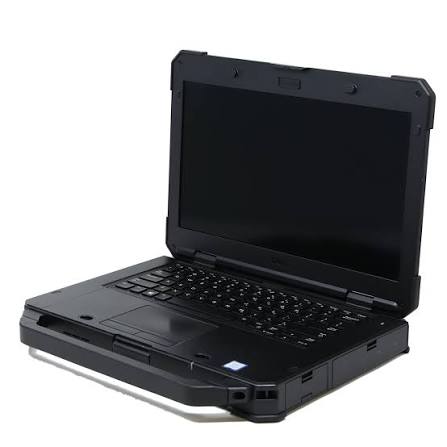
Field teams need computing equipment that can move easily between vehicles, outdoor locations, industrial facilities, and office settings. A device such as the panasonic toughbook cf-33 rugged computer combines the portability of a tablet with the typing convenience of a laptop, giving employees a practical way to complete different tasks without carrying multiple devices.
A Detachable Design for Changing Tasks
Field employees rarely spend their entire shift in one place. A construction supervisor may review plans while walking through a worksite and later prepare a detailed report in a temporary office. A utility technician may inspect equipment outdoors before entering maintenance records inside a service vehicle.
A 2-in-1 rugged computer accommodates these changing tasks through a detachable design. The tablet can be removed from the keyboard when employees need greater mobility. It can then be reattached when they need to enter substantial amounts of information, write reports, or work with keyboard-dependent software.
This flexibility can reduce the need to issue separate laptops and tablets. Employees can use one device for inspections, documentation, communication, and office assignments.
Protection Against Field Conditions
Ordinary computers are usually designed for controlled indoor environments. Field devices may face dust, water, vibration, accidental drops, and sudden temperature changes. These conditions can damage internal components, screens, keyboards, and connection ports.
A rugged computer uses a reinforced exterior and protected components to help it withstand specified environmental hazards. Models intended for field use may be tested against recognized military and ingress-protection standards.
The Toughbook CF-33 is a fully rugged computer with an IP65 rating and testing against relevant MIL-STD-810G conditions. Organizations should review the complete testing information to determine whether those standards match their working environment. No ruggedness rating makes a computer indestructible, but suitable construction can lower the risk of damage during normal field use.
Readable Display for Outdoor Work
Screen visibility is a major concern for outdoor employees. A display that looks clear in an office may become difficult to read under direct sunlight. Glare can prevent workers from viewing maps, instructions, forms, or equipment information.
The CF-33 has a 12-inch QHD multi-touch display designed for clear viewing in bright conditions. Its 3:2 screen ratio also provides useful vertical space for reading documents and completing forms.
Touchscreen and digitizer support allow employees to interact with applications without always relying on a keyboard or mouse. They may select menu items, record signatures, annotate documents, or enter information while standing. Companies should confirm that the screen works with any gloves or styluses employees will use.
Keyboard Access When More Typing Is Required
A tablet is convenient for viewing information and completing short forms. However, entering lengthy reports through an on-screen keyboard can be slow and uncomfortable.
A detachable keyboard gives field workers a more familiar typing experience when detailed data entry is necessary. It can also provide additional ports or physical controls, depending on the selected configuration.
This arrangement is especially useful for inspectors, public safety personnel, engineers, and service technicians. They can carry the tablet during active work and reconnect the keyboard when they return to a vehicle, desk, or other stable surface.
Battery Options for Long Shifts
Field personnel may spend hours away from a power outlet. If a computer cannot last through the required working period, employees may lose access to instructions, service histories, maps, and reporting applications.
The CF-33 uses a dual-battery design and supports hot-swapping. A worker can replace one battery while the computer continues operating on the other. This can help organizations maintain device availability during longer shifts.
Battery performance varies according to screen brightness, software activity, wireless connections, temperature, and battery condition. Companies should calculate expected daily use and determine whether they need standard batteries, long-life options, spare batteries, or vehicle chargers.
Support for Vehicle-Based Operations
Many field employees use computers inside service vans, trucks, emergency vehicles, or mobile command units. A compatible vehicle dock can secure the computer while providing access to power and other connections.
Once the employee reaches the destination, the tablet can be removed from the dock and carried to the work area. The same computer can later be connected to a keyboard or office dock for administrative tasks.
Before purchasing devices, organizations should examine mounting space, driver visibility, cable placement, power requirements, and compatibility with existing equipment. Older docks and port replicators may not work with a newer computer, even when both devices come from the same product family.
Connectivity for Mobile Employees
Field teams often need to communicate with central offices, access cloud-based applications, or submit reports from remote locations. Depending on its configuration, a rugged computer may support Wi-Fi, Bluetooth, GPS, cellular connections, and several physical ports.
GPS can assist with navigation, asset location, and route-based assignments. Bluetooth may connect the computer to scanners, printers, keyboards, or measuring tools. Cellular service can provide internet access when an approved Wi-Fi network is unavailable.
Every organization has different connection requirements. Buyers should identify the networks, peripherals, and business applications employees use before choosing a specific configuration.
Suitability Across Multiple Industries
A 2-in-1 rugged computer can serve teams in construction, utilities, transportation, public safety, manufacturing, warehousing, telecommunications, and field service.
Construction personnel can review drawings and document site progress. Utility workers can access mapping and maintenance records. Public safety teams can use the device inside a vehicle and carry the tablet when responding to an incident. Manufacturing employees can record inspections and connect to supported diagnostic equipment.
The device is most useful when employees need both mobility and access to full computer functions. Its value comes from matching the format, protection level, and configuration to real job requirements.
Selecting the Right Configuration
Organizations should review more than durability ratings when comparing rugged computers. Processor performance, memory, storage, operating system, wireless options, security features, ports, cameras, and accessories can differ between configurations.
IT teams should also confirm application compatibility and device-management requirements. Procurement staff can then assess warranty coverage, repair support, replacement parts, and the expected service life.
A well-selected 2-in-1 rugged computer can help field teams collect information, communicate, and complete reports from one device. To compare Panasonic CF-33 configurations and find rugged computing equipment suited to your working conditions, visit Tough Rugged Laptops today.